
NewStockivia on your phone

Goodbye notebook, welcome Stockivia.

Say goodbye to the paper notebook and welcome Stockivia, the point of sale and stock software built for Algerian shops: in Arabic and French, fast on old PCs, with a digital credit book and perfect Arabic receipts.

Free demo, no bank card.

  • Windows 10 and 11
  • Arabic, French, English
  • Lifetime licence, paid once

Real life in a shop

Your shop’s daily problems, solved by Stockivia.

  1. 017:30 pm, power cut

    The power goes out mid-sale. Nothing is lost.

    Every scanned item is written to disk the moment it is scanned. When the power comes back, Stockivia reopens the cart exactly where you left it, and checks the PC clock before selling.

  2. 02The credit book

    The paper notebook goes digital. No more arguments.

    Who owes what, and since when: it is all there. Receipts show the previous balance, the payment and the new balance. A polite reminder goes out on WhatsApp in one tap.

  3. 03The barcode scanner

    A scanner on a French or Arabic keyboard? It just works.

    Elsewhere, as soon as the keyboard is not in English, the scanner types symbols instead of digits. Stockivia recognises the scan from the physical keys, whatever the keyboard language.

  4. 04Receipts in Arabic

    Perfect Arabic receipts, on any thermal printer.

    Many printers cannot join Arabic letters: they print separate letters, backwards. Stockivia draws the receipt itself and sends it as an image, so the Arabic comes out perfect, every time.

  5. 05Prices that keep changing

    Prices changed again? One operation updates them all.

    Raise a category by 5%, or the items you searched for or ticked by 20 DA. Every change is kept in the price history, and the labels reprint right away.

  6. 06The old PC behind the counter

    A Celeron with 4 GB of RAM? Stockivia stays fast.

    Stockivia is light by design: no server to install, a local database, and an interface that only loads what it needs. These are our performance targets for this kind of PC, checked with every release.

  7. 0710 pm, closing time

    Close the register at night, without a calculator or stress.

    Count your notes: Stockivia compares with what is expected and shows you the difference. The day’s summary is saved and can no longer be changed. The 2027 rules for point of sale software ask for data that cannot be altered and is archived.
NewThe phone app

Stockivia on your phone too.

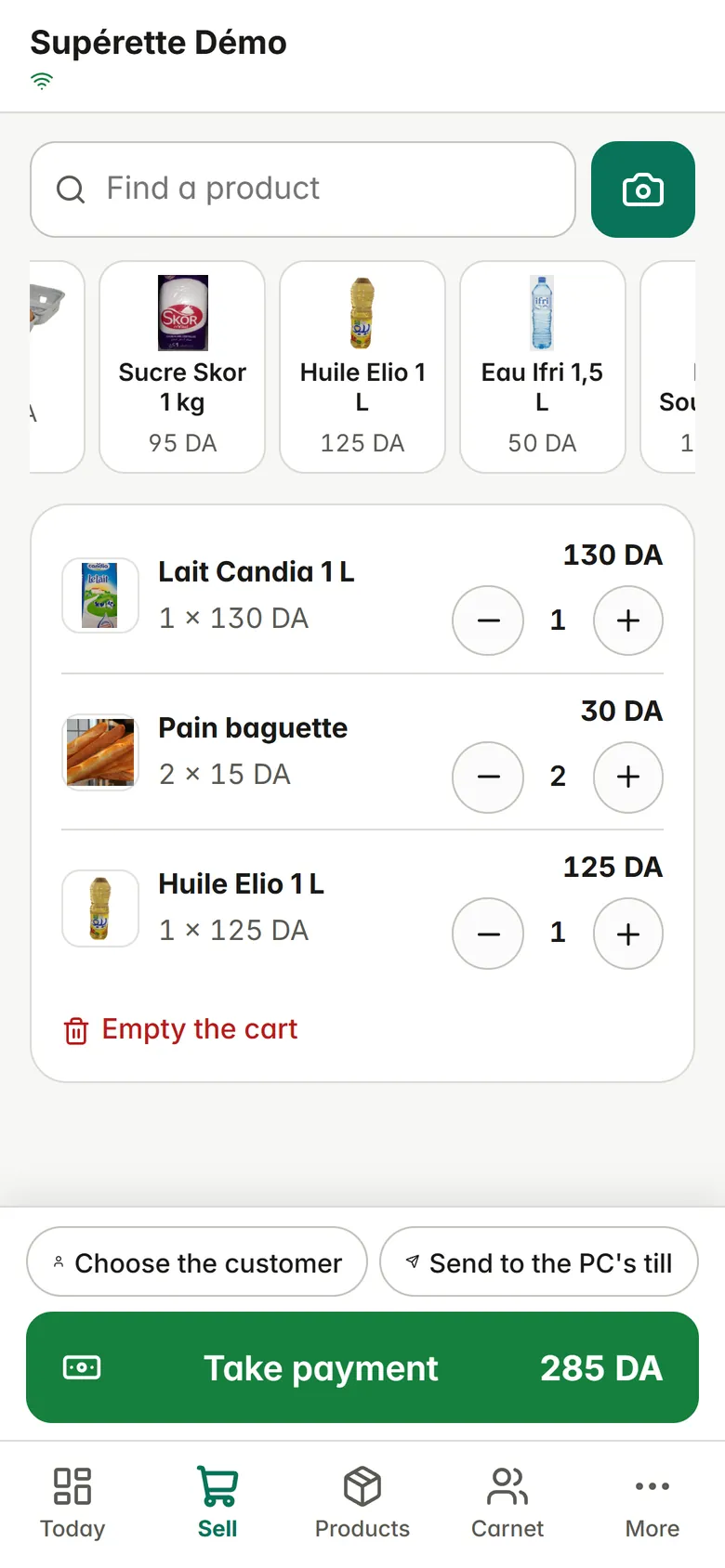
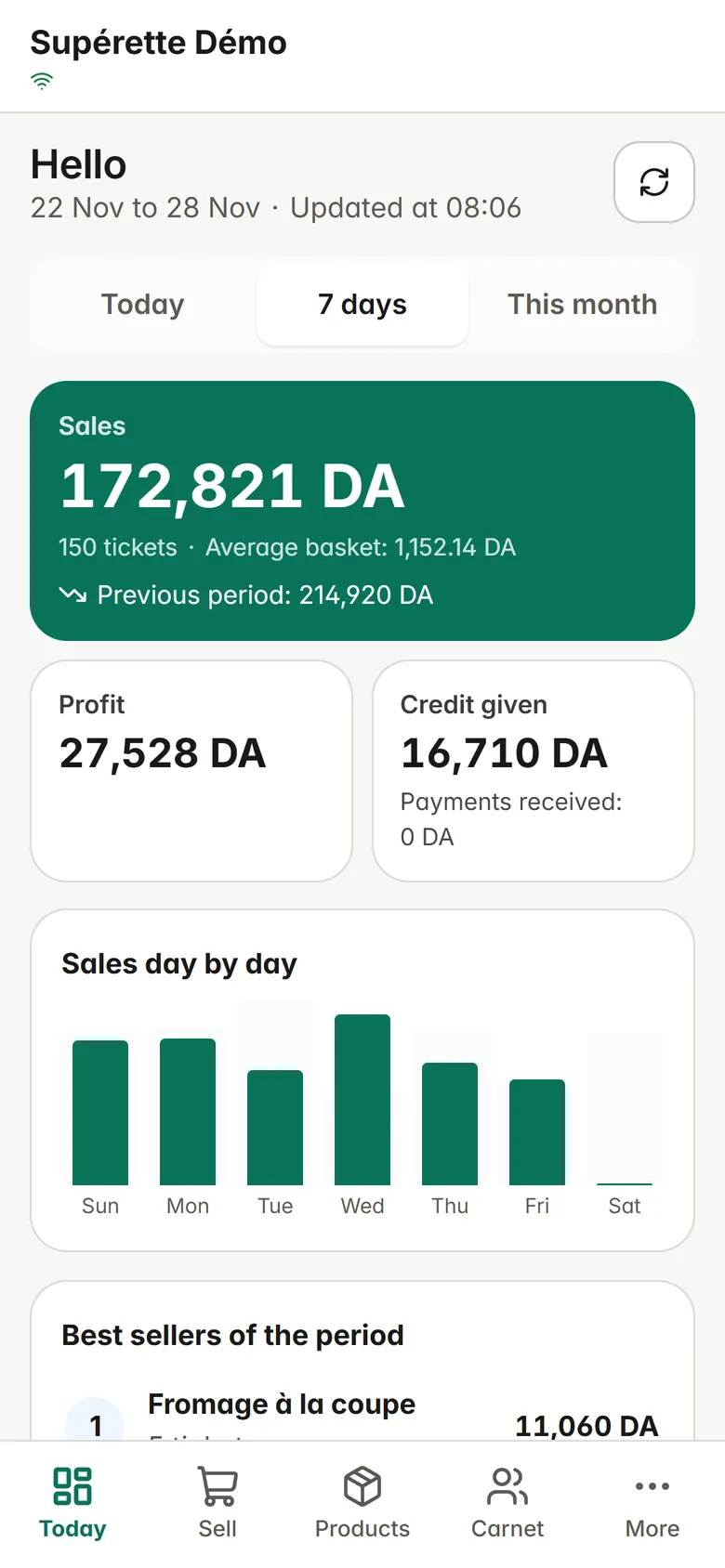
Link the phone to the PC once, with a QR code. It then sells, keeps the credit book, shows the day’s and the month’s profit, and gives every item’s price and stock. Everything goes through the shop’s PC, over its Wi-Fi, even without internet: one stock, one credit book.

Android and iPhone, nothing to install

The QR code opens the app in the phone’s browser: keep it on the home screen. Barcodes are read from a photo.

Stockivia Scanner for AndroidComing soon

It reads barcodes continuously, like a handheld scanner: aim, beep, next item.

Included in the free demo and in the licence paid once. The phone on the shop’s Wi-Fi, with Stockivia open on the PC.

See the steps
  • Sell from the aisle

    The phone has its own cart: barcode, search or quick buttons, sales on credit, the receipt on WhatsApp or printed by the PC. Or it sends the cart to the PC’s till.

  • Price and stock in hand

    Scan an item: its price, its stock, a delivery, a loss, a count, its photo. An unknown code becomes a product in seconds.

  • The figures, from the day to the month

    Sales, profit and credit given, hour by hour or day by day over 7 days and over the month, against the period before. And what your customers owe you.

  • Everyone has their own PIN

    Each person signs in with their own PIN, as on the PC: a cashier sells but does not see the profit and changes neither prices nor stock. “Unlink the phones” cuts off a lost phone.

Interactive demo

Try the till, right here, right now.

Tap an item to “scan” it, take cash and see the change to give back. This is a demonstration in your browser: no real sale is recorded.

StockiviaDemo, no real sale

Features

Everything a shop really uses. Nothing more.

Simple mode shows only the essentials. Advanced mode unlocks the rest when you need it.

  • 100% offline, forever

    Selling, stock, credit book, register: everything works without internet. Internet is only for online backups and updates.

  • Digital credit book

    Credit limits, payments, statements and WhatsApp reminders. Receipts show the previous and new balance.

  • Arabic as a native language

    Interface, search and receipts in Arabic, French or English. Switch language without restarting.

  • Scan, search and departments

    Typo-tolerant search in Arabic or French. Quick buttons sorted by department, best sellers first.

  • Bulk price changes

    By percentage or amount, by category or on a selection, with price history.

  • Cash register

    Opening float, cash in and out, the counted difference and a saved summary of the day.

  • Your day in 4 figures

    Sales, profit, takings today and credit given: the figures a shopkeeper really watches, on the home screen.

  • Automatic backups

    A local copy at every closing, on a USB key if you like, and an encrypted online copy with Premium.

  • Voice-guided tutorials

    Guided tours in Arabic, French and English, with subtitles. The voice turns off in one click.

  • Every payment method

    Cash with change, CIB or Edahabia card on your terminal, BaridiMob, CCP, cheque, credit and mixed payments.

  • Your data stays yours

    Export everything to Excel, any time. Even without a valid licence, you can view, print and export: nothing is ever locked.

  • Text at your size

    Normal, Large or Very large: Stockivia asks you at the very first start.

  • Built for the 2027 rules

    An unalterable sales journal and a saved summary of every day: our mechanisms for the inalterability and archiving of data, two of the conditions set for 2027. Stockivia is not certified software.

Made for the counter

Built for Algerian shopkeepers, with them.

languages: Arabic, French and English
3
internet connection needed to sell
0
GB of RAM is enough
2
wilayas: download the demo anywhere in Algeria
69

The first testimonials are on their way.

Trying Stockivia in your shop? Tell us what works and what is missing: your feedback decides the next releases.

Share my feedback

Pricing

Clear prices, in dinars.

A free demo, then one licence paid once. No hidden fees, no sales call.

See pricing
  • Demo

    Try every till feature in your own shop, with no commitment.

    Free

    No time limit, no bank card.

  • Premium

    For every shop, from the grocery store to the wholesaler.

    45,000 DA one time

    Pay once, use it forever.

FAQ

The questions we hear most

All questions

Does Stockivia work without internet?

Yes. Every daily feature (selling, stock, credit book, register, printing, reports) works without internet, forever. Internet is only used for the encrypted online backup, updates and online activation. Activation also works without internet, through WhatsApp.

Is there a phone version of Stockivia?

Yes: the phone app, included in the demo and in the licence. The phone links to the shop’s PC with a QR code (Settings, Options, “Phone app”) and works over the same Wi-Fi, even without internet. It sells, keeps the credit book, shows the figures of the day, the last 7 days and the month, and gives every item’s price and stock. It works with the PC, not instead of it: the stock, the sales and the credit book stay on the PC, and the phone does not connect to it from outside the shop. It also serves as a barcode scanner for the PC’s till and stock counts. Android and iPhone, nothing to install; the Stockivia Scanner Android app, which reads continuously like a handheld scanner, is coming soon.

Do Arabic receipts print correctly?

Yes. Many thermal printers cannot join Arabic letters. Stockivia draws the receipt itself and sends it to the printer as an image, so the Arabic prints perfectly on 58 mm and 80 mm paper. You can also print bilingual Arabic and French receipts.

My PC is old. Will Stockivia be slow?

Stockivia is built for modest counter PCs: a Celeron or Pentium processor, 2 to 4 GB of RAM, a classic hard drive, a 1366 x 768 or even 1024 x 768 screen. It needs Windows 10 or 11, 64-bit. The easiest way to know: install the free demo and try it on your own PC.

Is my data safe?

Your data stays on your PC. Stockivia makes automatic backups at every register closing and every day, and can copy them to a USB key. With Premium, a copy also goes online: it is encrypted on your PC before it leaves, with a recovery code to print.

Try Stockivia in your shop, for free.

Download the demo, sell with it, put it to the test. When you are ready, order your licence on WhatsApp.