Guide
Point of sale software in Algeria: how to choose, and what Stockivia does
Point of sale software (also called POS or cash register software, “logiciel de caisse” in French) for an Algerian shop must first sell without internet, print Arabic correctly, keep the customers’ credit book and stay fast on a modest PC. Stockivia is point of sale and stock management software for Windows, built for these needs: it works offline, in Arabic, French and English, and its licence is paid once (45,000 DA). A free demo lets you try it in your own shop.
· Published by Stockivia, the maker of the software described on this page.
In short
- Who it is for: mini-markets and grocery shops, wholesalers, hardware shops, cosmetics, clothing, phone shops, auto parts, bakeries, greengrocers, butchers, stationers.
- System: a PC running 64-bit Windows 10 or 11, 2 GB of RAM, 300 MB of disk space.
- Languages: Arabic, French and English, on screen and on receipts.
- Internet: not needed to sell, manage stock, keep the credit book or print.
- Price: a free demo, then Premium at 45,000 DA, paid once for one station. Extra station: 9,900 DA, paid once.
- Support: on WhatsApp and by phone, in Arabic, Darija, French or English.
8 points to check before choosing point of sale software
These questions apply to any software, ours included. Ask the seller, then check the answers yourself with a trial version, on your own hardware.
- Does it sell without internet? A till that stops when the connection drops stops the shop too.
- What happens to the sale in progress during a power cut? The cart should come back as it was when the PC restarts.
- Does Arabic print correctly on your thermal printer? Ask for a test receipt, not a promise.
- Does it keep the credit book: who owes how much, since when, and up to what limit?
- Does it stay fast on the PC you already have, with thousands of products?
- Does your barcode scanner work when the keyboard is set to AZERTY or Arabic?
- Is the price paid once, or does it have to be renewed? And what happens to your data if the licence is no longer valid?
- Can you export all your data to Excel, at any time?
What Stockivia does at the till
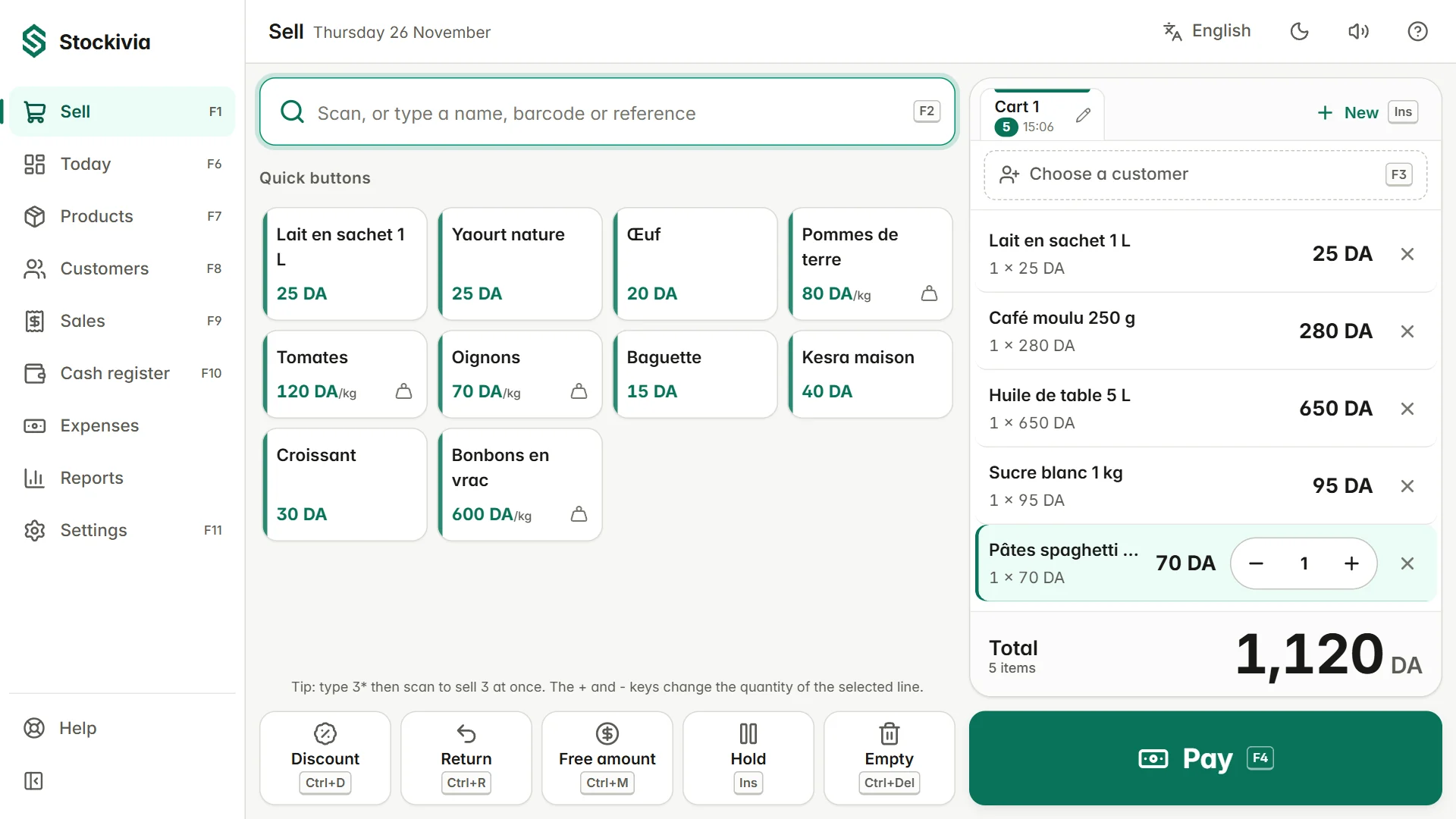
The sale screen fits on one page: search at the top, quick buttons, the cart and the total. Here is what it can do.
- Scan a barcode with a USB scanner, whatever the keyboard language.
- Find a product by typing a few letters, in Arabic or French, even with a typing mistake.
- Sell without a barcode using quick buttons, grouped by aisle, best sellers first.
- Sell by weight, and read the barcode labels printed by a scale.
- Keep several carts on hold when a customer goes back for something.
- Sell on credit: the receipt shows the previous balance, this receipt’s credit and the new balance.
- Take a return or an exchange from the original receipt.
- Give a discount on a line or on the whole receipt, depending on the cashier’s rights.
- Open and close the register: opening float, cash in and out, then the difference between the expected and the counted amounts.
- Give each cashier a PIN, and keep some actions for the manager’s approval.
The credit book, inside the till
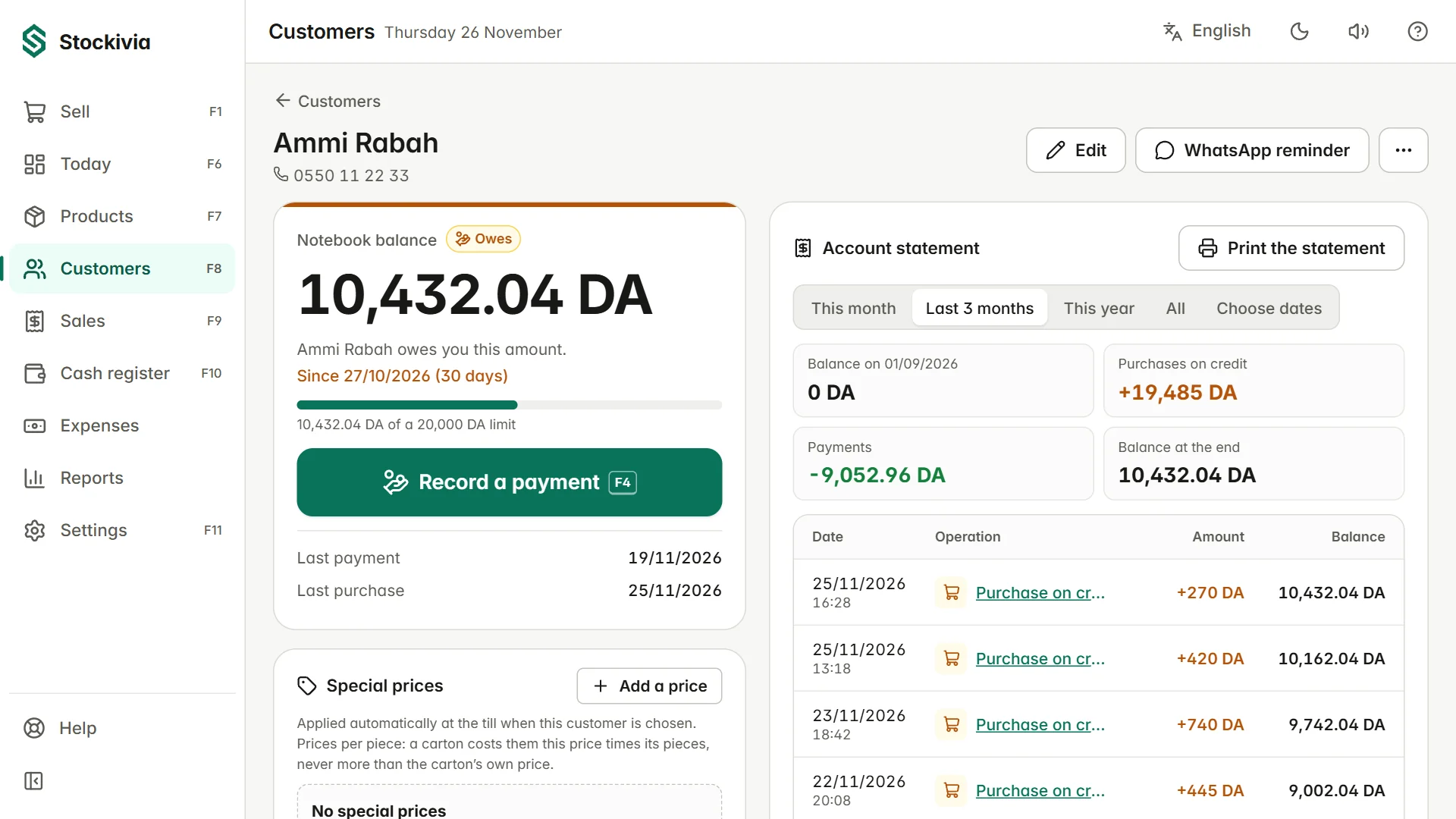
In many shops, regular customers’ credit is still written in a paper notebook. In Stockivia, each customer has an account: the balance, the date since which they owe, a limit if you set one, their payments and a statement to print.
A credit sale is made from the cart, for all or part of the amount. A reminder is one click away: WhatsApp opens with the message already written, and you send it yourself.
Who Stockivia suits best
Stockivia is made for retail and wholesale shops where one to a few people sell, receive goods and keep the accounts. It adapts to your trade from installation: see the features by type of shop.
It suits you especially if you sell a lot on credit, if your connection or your electricity is unreliable, if your PC is old, or if your customers want a receipt in Arabic.
When Stockivia is not the right choice
It is better to know before buying. Stockivia is not made for:
- restaurants and cafés: it does not manage tables or orders sent to the kitchen;
- pharmacies: it has no pharmacy-specific module;
- a Mac, a Linux PC or an Android tablet: it installs on Windows only;
- several shops kept in sync over the internet: with the Extra station option, Premium links the tills of one shop on its local network. For anything else, talk to us about Stockivia Custom;
- general accounting and payroll: it prepares the exports for your accountant, it does not replace your accountant.
Price and licence
The demo is free, with no time limit. It contains the till features, with limits: 300 products, 40 sales a day, 25 customers and 10 documents a day, and the word DEMO on receipts.
Premium costs 45,000 DA, paid once, for one station and with no limits. Each extra station costs 9,900 DA, paid once. If a licence is no longer valid on a PC, Stockivia becomes read-only: you can still view, print and export your data.
Detailed prices and ordering on WhatsApp are on the Pricing page.
How to try it in your shop
Four steps are enough to know whether Stockivia suits you.
- Download the free demo and install it: it does not need administrator rights.
- Open the sample shop, or start with your own products: by hand, from an Excel file, or by ticking them in the catalogue provided.
- Plug in your printer and your scanner, then print a test receipt in Arabic.
- Sell with it for a few days. After you buy, the products, customers and suppliers you created in the demo are imported into the official version; the demo’s sales and the credit book balances are not carried over.
Frequently asked questions
How much does point of sale software cost in Algeria?
At Stockivia, the demo is free and the Premium licence costs 45,000 DA, paid once for one station. Prices differ from one publisher to another: compare the total cost over several years, counting the licence, renewals, extra stations and support.
Do you need internet to use point of sale software?
Not with Stockivia: selling, stock, the credit book, printing and closing the register all work without a connection. Internet is used for the online backup, updates, online activation (which can also be done with a code exchanged on WhatsApp), WhatsApp reminders, the daily summary and the photos of the product catalogue.
Can Stockivia be used without a barcode scanner?
Yes. Quick buttons and search by name are enough to sell, and a phone linked to the PC over the shop’s Wi-Fi can act as a scanner, at the till and for stock counts.
Does Stockivia work with a touch screen?
Yes. Touch screens are supported, with large buttons and an on-screen number pad.
How many tills can be linked?
The Premium licence includes one station. Each extra station adds a till on the shop’s local network, without internet. For many tills or several shops, contact us about Stockivia Custom.