Guide
Offline point of sale software for Windows: what works without internet, power cuts and backups
Stockivia installs on your Windows PC and keeps your data on that PC. Selling, managing stock, keeping the credit book, printing and closing the register need no internet connection. Internet is only used for what leaves the shop: the online backup, updates, online activation and messages.
· Published by Stockivia, the maker of the software described on this page.
In short
- Without internet: sales, stock, purchases, credit book, printing, register closing, reports.
- With internet only: online backup, online updates, online activation, WhatsApp reminders, daily summary, photos of the product catalogue.
- Power cut: each completed sale and the cart in progress are already saved on the disk.
- Backups: automatic every day and at each register closing, with an optional copy to a USB key.
- System: 64-bit Windows 10 or 11, 2 GB of RAM, 300 MB of disk space.
- Several tills: linked over the shop’s local network, without internet.
What works without internet
Everything you use every day works without a connection, and always will: it is not a fallback mode.
- Selling, taking payment and printing receipts.
- Stock, purchases, deliveries and stock counts.
- The credit book, payments and statements.
- Opening and closing the register, and the day’s summary.
- Reports, quotes, invoices and delivery notes.
- Backups on the PC and on a USB key.
- Several tills on the shop’s local network.
- A phone used as a barcode scanner, over the shop’s Wi-Fi.
- Tutorials and help, installed with the software.
What needs a connection
Only what has to leave the shop goes through the internet, with one exception: the photos of the products in the supplied catalogue are downloaded when the PC is connected. Without internet, the product is created without its photo, and you can add it later.
- The online backup, included in Premium.
- Online updates. Without internet, an update can also be installed from a file, for example on a USB key.
- Online activation of the licence. Without internet on the PC, it is done with a code exchanged on WhatsApp.
- Reminders sent to customers on WhatsApp.
- The daily summary received by Telegram or email, included in Premium.
During a power cut
Each completed sale is written to the disk at once, and so is the cart in progress. When the power comes back, Stockivia reopens the cart where you left it.
A power cut can also upset the clock of an old PC, when the motherboard battery is worn. If the PC’s date has gone backwards, Stockivia says so and blocks selling until it is corrected, explaining how: your sales stay in the right order.
Backups
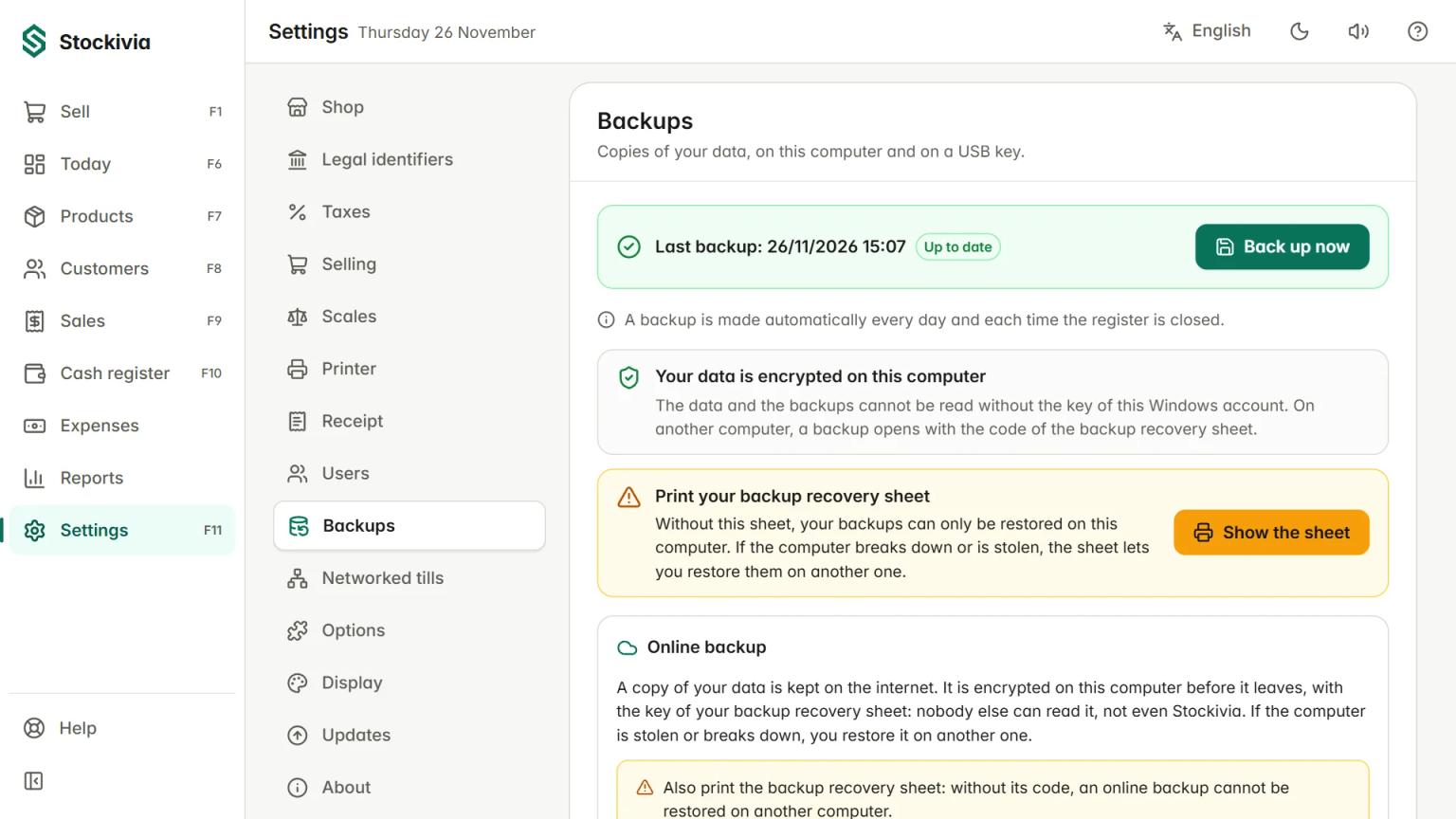
A backup is made automatically every day and at each register closing, as well as before each update. You can run one at any time, and have them copied to a USB key or to a second folder as well.
Data and backups are encrypted on your PC. To open them on another computer, you need the code on the backup recovery sheet, which Stockivia asks you to print and keep outside the shop.
With Premium, a copy also goes online. It is encrypted on your PC before it leaves, with the key from your recovery sheet: nobody else can read it, not even Stockivia. This online backup stays off until you turn it on.
Restoring, or changing PC
If the PC breaks down or is stolen, install Stockivia on another PC and ask on WhatsApp for your licence to be transferred: we activate the new station.
Once the licence is activated, restore your last backup from the first screen: from the USB key, or from the internet with Premium, by typing the code from your recovery sheet.
On a modest PC
Stockivia needs no server and no separate database to install: everything is inside the software. It needs 64-bit Windows 10 or 11, 2 GB of RAM, 300 MB of disk space and a screen of 1024 x 768 or more.
Our performance targets are set for an old counter PC (Celeron processor, 4 GB of RAM, ordinary hard disk): starting in under 3 seconds and scanning a product in under 50 milliseconds. The surest way is still to try the demo on your own PC.
Several tills, still without internet
With the Extra station option, several tills share the same data over the shop’s local network. If the main station is switched off or the network goes down, each till keeps selling: its sales are sent as soon as the link is back.
Your data stays with you
Your data is on your PC, not on a server out of your reach. You can export everything to Excel at any time. Even if a licence is no longer valid, Stockivia stays open in read-only mode: you can view, print and export.
Frequently asked questions
Does Stockivia really work with no connection at all?
Yes. A shop without internet can use it every day: selling, stock, credit book, printing and closing the register. The licence itself can be activated without internet on the PC, with a code exchanged on WhatsApp from a phone.
What happens if the PC breaks down or is stolen?
You install Stockivia on another PC, ask on WhatsApp for the licence to be transferred, then restore your last backup, from a USB key or from the internet with Premium. You need the code on the backup recovery sheet: print it and keep it outside the shop.
Do you need internet to activate the licence?
No. With internet, activation is done online with the licence key. Without internet on the PC, it is done with an activation code exchanged with us on WhatsApp.
How do you get updates without internet?
An update can also be installed from a file, for example on a USB key. Stockivia checks the signature of each update before installing it, online or from a file.
Is my data sent anywhere?
Your sales and stock data stay on your PC. They only go online if you turn on the online backup, encrypted on your PC before it is sent, or the daily summary, which sends you the day’s figures on your own Telegram or email.